When I started this review, Adobe had not yet purchased Serious Magic. The acquisition makes sense: Serious Magic is that rare company that has defined new product categories to fill essential needs. It must be nice to have no competition.
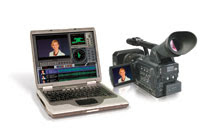
DV Rack provides several tools, but at its core, it's a direct-to-disk video recording and monitoring application. It is meant to be used with a video camera on set, and it has been engineered to work with any recent Windows 2000/XP laptop or desktop with a good video card. (Serious Magic recommends a 1.4GHz-or-faster processor and at least 256MB RAM.) DV Rack has to be tethered to the camera, so it is probably most useful in the studio or under controlled outdoor situations. While it's not out of the question, you are probably not going to use DV Rack for run-and-gun shooting.
There are two versions of DV Rack 2: SD and HD. DV Rack HD 2 is meant to work with HDV, DVCPRO 50, and DVCPRO HD. The HD version provides 1280×720 monitoring for pixel-to-pixel accurate display of 720p footage. Timecode support for Adobe Premiere Pro, Apple Final Cut Pro, Sony Vegas, and Avid's line of NLEs has been added, so you can save clips to a hard drive via FireWire in the format you plan to use in your NLE.
What's new?
The first innovation in DV Rack 2 that grabbed my attention is the Stop-Motion Animation Recording feature. Essentially, the DV Rack software can be used to trigger the camera in a frame-by-frame mode. The basis for a software intervalometer, Stop-Motion Animation Recording is just one of the several “single-frame” recording modes — there's also Time-Lapse Recording and Motion-Activated Recording. For time-lapse, the options are more or less infinite: frames per second, frames per minute, or frames per hour. Any time interval you can type into the entry field is what the camera will record.
I did a short stop-motion animation to try out this feature. I can report that it's a very good replacement for Animation Toolworks' LunchBox, a dedicated frame recorder that has been around for at least a decade. Stop-Motion mode is operated from the direct-to-disk module in DV Rack, working in the pause/record mode. From there, you use the Single Frame Advance button. The only problem is that, while you can erase entire clips, you cannot delete a previous frame. This is easy enough to do later in an NLE, but it does become annoying during playback within DV Rack. However, the scrubbing — playing back stored digital frames — is absolutely great. One improvement would be the addition of speed control, such as you find in the advanced player controls in QuickTime. As it is now, this is a great feature and one that should inspire a lot of new stop-motion work.
The Motion-Activated feature detects changes in luminance, which triggers recording without user intervention. This is highly customizable and is useful for security work or for capturing wildlife footage with an unattended camera and laptop — just remember to bring extra batteries.
DV Rack also includes Onion Skin Split Mode, a feature that stores the previous frame of video in memory so you can show the previous and current frame in a splitscreen. Actually, you can drag any frame (in a supported format) from the hard drive to the Record Monitor to compare it with the current frame. The “split” is a resizable window that allows you to select any portion of the frame for the comparison. An opacity slider appears on the lower right-hand side of the record monitor so you can turn the split window into a semi-transparent overlay. This is known in animation parlance as onion-skinning.
Onion-skinning is useful for matching lighting and for checking continuity in shots for visual-effects work. For example, one character morphs into the same character in a new costume and makeup. All you have to do is send the actor to makeup and wardrobe for an hour and when they return, bring up the frame of them in the previous costume and match the position of one frame on top of another. This feature replaces a DVX box for matching on stage — the way things were done in analog production for many years. DV Rack produces cleaner video and more flexible options for visual effects previewing when recording live action.
Pause Recording overcomes a limitation from the first version of DV Rack. The original software created a new clip if you paused during recording. This was annoying if you wanted to capture actors improvising dialog. Often, directors like to operate the camera while directing and selectively capture performances. With the new Pause Recording feature, you don't pile up lots of individual shots. You can also hit the Record button while recording to create a new clip instantly without losing a frame.
Monitoring
DV Rack originally focused on signal evaluation that wasn't possible within a DV camera's built-in display. Some cameras have zebra bars built in, but not the full range of other features that will help prevent hard-to-spot or -hear problems. DV Rack turns the computer monitor into a broadcast monitor with underscan, safe-area grids, and 16:9 letterbox. There are also user-definable Clip Alerts for video and audio. For instance, if the signal goes above a particular white level, an alert is shown in the DVR. The cool thing is that these Clip Alert thresholds can meet your specific needs, not just broadcast standards. This feature worked well with my old Canon Optura when I panned across a dark room. It set off a “underexposed” alert that appeared as a red rectangle on the timeline. The same thing would happen if an actor were too close to a mic and created a pop.
In version 2 of DV Rack, the waveform monitor and vectorscope have been improved, with higher sampling rates made possible by today's faster CPUs. The new Audio Spectrum Analyzer III goes beyond mere volume alerts. It displays the signal much the way it is displayed on a multiband equalizer (volume per frequency). The new display shows the entire frequency range, so you can isolate specific frequency ranges — for instance, sibilant sounds (sssss), hums, buzzes, and other faint problems that are hard to catch on headphones. Selected sounds can also be user-defined as Clip Alerts.
Another new refinement in DV Rack 2 is the ability to re-import clips from the hard drive back to any of the test gear. While a re-import does not include the Clip Alerts, you will be able to re-analyze the recorded material with all the test gear. Re-importing is a simple drag-and-drop operation. This would be even cooler if you could insert-edit into existing clips, something that would be of interest to animators and visual effects artists. You get halfway there, because you can do a splitscreen or onion-skinning comparison between new footage and the re-loaded clip. That's an extra step, but this way, you would be able to do animation patches that could be inserted into an NLE later on.
With support for higher-resolution LCD screens for HD (up to 1280×720), DV Rack also optimizes your computer monitor for use in the field, turning your laptop into an HD monitor. While this is not a true NTSC monitor for judging color, it is the proper resolution for native 720p. Once you learn to use and trust the vectorscope and waveform, you will be able to expose your video accurately — even if your laptop monitor is not giving you the whole story. DV Rack provides all the graphic aids that you would find on a reference monitor — including user-definable aspect ratios, rule-of-thirds grids, center crosshair, zoom-in to live video (to examine any part of the screen), and freeze video (to look at individual frames). Having worked for years with a video cart next to the camera, I find it amazing that those tools are now available in a software package that is far more portable.
One other advantage to the monitoring functions is that the monitor works as a native DV monitor, so you see the video as it appears with compression. This is extremely important when working in low-light situations.
DV Rack also generates color bars with blue-gun mode. You might say, “Well so does my NLE,” but actually, the bars that you download from the Internet are just an image subject to the monitor's color bias. DV Rack's bars are generated internally. The software guides you through the steps necessary to calibrate your computer system.
A clip by any other name
It is now possible to rename and reorder clips as they are recorded. If you have a buttoned-up AD and script person, this is very useful. Without the cost of film to act as a restraint on shooting, DV clips pile up very quickly. Many new filmmakers underestimate the time it takes to screen and organize material for editing after the shoot. The ability to organize takes on set while performances are fresh in your mind saves a lot of time down the road as you set up editing bins.
I would like to see a way to stretch the timeline horizontally. This is useful for doing stop-motion, when you need to find specific frames. Right now, 30 frames of video — which might represent half an hour of stop-motion work — appear as a tiny portion of the total width of the recording timeline. A basic timeline zoom control would be great.
Countdown
The original DV Rack included a shot clock, but in version 2, Serious Magic has added a countdown feature. As anyone who shoots live-action commercials knows, you live by a stopwatch. When directing talent, you need to evaluate the length of line reads. I'm not sure why it's important, but DV Rack 2's shot clock hooks into the atomic clock at the U.S. Naval Observatory. That time stamp is accurate to several decimal places — for those of you who care about being really, really punctual.
Sorry, Mac users
DV Rack only works under Windows, mainly because the critical overlaying features are dependent on Windows DirectShow. While there is no Mac version planned, DV Rack 2 has added QuickTime support. The DV Rack product manager told me the software does not officially support the beta version of Apple BootCamp, but DV Rack is known to work on dual-core Intel-based Macs. Also, Parallels Desktop 1.0, the third-party Mac software that permits simultaneous operation of OS X and Windows XP, hopes to support Direct X in the near future. This would provide an option for Final Cut Pro users to use DV Rack without having to reboot to Windows.
Upgrades
There are multiple upgrade paths (seven, I'm told) for DV Rack early adopters. Check the site for details, but the basic pricing for new users is $499 for the full version and $199 for the upgrade.
This is great software for DV and HD users in the indie world. Highly recommended. Serious Magic is one of those companies that makes desktop production exciting, and there is much anticipation of added functionality with Adobe behind Serious Magic.


 Pencak Silat